How to Find Your Exact GPS Coordinates
To find your exact GPS coordinates, open a location tool in your browser and allow it to access your location — you’ll see your latitude and longitude within a few seconds. On a phone with GPS, those coordinates can be accurate to within a few meters. The fastest way is a privacy-first tool like My Location, which reads your position the instant the page loads, no app install or account needed.
This guide explains what those two numbers actually mean, how your browser finds you, and how to get a reading you can trust — whether you’re dropping a pin for a delivery, marking a trailhead, or reporting exactly where something happened.
What GPS coordinates actually are
Every point on Earth is described by exactly two numbers:
- Latitude — how far north or south of the equator you are, from −90° at the South Pole to +90° at the North Pole. The equator is 0°.
- Longitude — how far east or west of the prime meridian you are, from −180° to +180°.
Together, latitude and longitude pin down any spot on the planet. The order matters: coordinates are almost always written latitude first, then longitude. Get them backwards and you can land yourself in the wrong hemisphere.
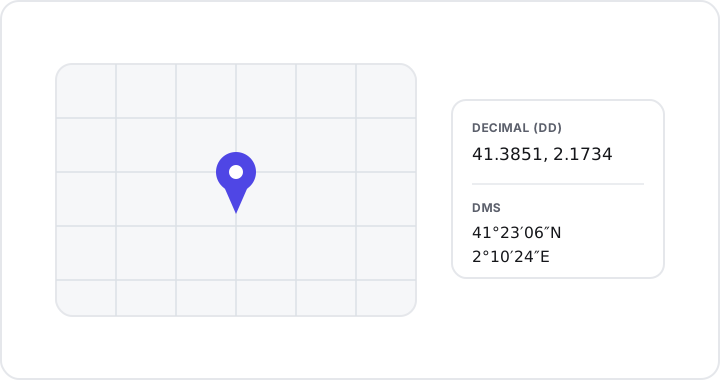
A negative latitude means south; a negative longitude means west. So 41.3851, 2.1734 sits north of the equator and east of the prime meridian, while -33.8688, 151.2093 is south and east.
Decimal degrees vs DMS: two ways to write the same point
You’ll run into coordinates written in two different formats, and it’s worth knowing both because they describe the exact same location.
Decimal degrees (DD)
Decimal degrees express the position as two plain numbers, for example:
41.3851, 2.1734This is the modern, friendly format. It pastes straight into most map apps and search boxes, it’s easy to store, and it’s compact. If you’re sharing a location with someone or dropping it into a maps URL, DD is usually what you want.
Degrees, minutes, seconds (DMS)
DMS is the traditional notation, splitting each coordinate into degrees, minutes, and seconds with a compass direction:
41°23'06"N 2°10'24"EDMS is still standard in aviation, marine navigation, and surveying, and it shows up on a lot of older maps. It carries the same information as DD — 41.3851 north is simply 41°23'06"N — just written differently.
The practical takeaway: pick whichever format the person or tool on the other end expects. For everyday sharing, decimal degrees almost always wins.
How your browser finds you
When a website asks “where are you?”, it uses the browser’s Geolocation API. This is built into every modern browser and combines several signals to estimate your position:
- GPS satellites (on devices that have a GPS chip, like phones and tablets)
- Wi-Fi networks nearby, matched against a database of known access points
- Cell tower signals
Crucially, the browser asks your permission first. Nothing reads your location until you tap “Allow” — and that permission is per-site, so you stay in control.
Accuracy depends heavily on the device:
- On a phone with GPS, your position can be accurate to within a few meters. That’s good enough to identify a specific building entrance or trail junction.
- On a desktop or laptop without GPS, the browser falls back to network-based location (Wi-Fi and IP). This is less precise — sometimes accurate only to a city block or neighborhood.
Tips for the most accurate reading
A few simple habits dramatically improve your fix:
- Grant permission when prompted, and make sure your device’s location services are switched on.
- Get near a window or step outdoors. GPS needs a clear view of the sky; thick walls and underground spaces block satellite signals.
- Wait a few seconds. The first reading is often rough, then sharpens as more satellites lock in. Give it a moment before you copy the numbers.
- Use a phone over a desktop when precision matters, since the phone almost certainly has true GPS hardware.
When you’ll actually need your coordinates
Coordinates feel abstract until a real situation calls for them. A few common ones:
- Travel and meetups — share an exact spot with a friend when a street address is vague or doesn’t exist (“the trailhead parking lot,” “the third pier”).
- Hiking and the outdoors — mark a campsite, a water source, or where you parked, so you can navigate back even without signal.
- Deliveries and logistics — give a courier the precise gate or loading dock instead of a building number that covers half a block.
- Reporting a location — note exactly where a pothole, hazard, wildlife sighting, or incident is, so the right people can find it again.
In each case, the goal is the same: turn “somewhere around here” into two numbers anyone can act on.
Get your coordinates in seconds
My Location shows your live coordinates and street address the moment you open it — no download and no account required. From there you can:
- Copy your position in either decimal degrees or DMS with one tap.
- Save places with names and notes so you can return to them later.
- Sketch routes between points.
- Share a live link so others can see where you are.
- Export everything as GPX, KML, or GeoJSON for use in other mapping software.
It also installs as an app (PWA) and works offline, which is exactly when you tend to need it most — on a trail or in a parking garage with no signal. And because it’s privacy-first, your saved places and data stay on your device. It’s free and available on the web and Android.
Key takeaways
- Two numbers locate anything on Earth: latitude (−90° to +90°, north/south) and longitude (−180° to +180°, east/west), written latitude first.
- DD and DMS are the same point in different notation —
41.3851, 2.1734equals41°23'06"N 2°10'24"E. Use decimal degrees for easy sharing. - Your browser’s Geolocation API combines GPS, Wi-Fi, and cell signals, and always asks permission first.
- Accuracy varies: a few meters on a GPS phone, much rougher on a network-only desktop.
- For the best fix: allow location access, get near a window or outdoors, and wait a few seconds for the reading to settle.
Ready to see exactly where you are? Open My Location — it’s free, instant, works offline, and keeps your data on your device.