How to Create a Strong Password (the Right Way)
To create a strong password, make it long and random: aim for at least 16 characters generated by a cryptographically secure source, and use a different one for every account. Length and unpredictability are what actually stop attackers — not how many exclamation marks you cram in. The fastest way to get one is to let a tool build it for you, like Andev’s Password Generator, which creates passwords right in your browser and never sends them anywhere.
What actually makes a password strong
A password is strong when it’s hard to guess and hard to brute-force. Two things drive that:
- Length. Every extra character multiplies the number of possible combinations an attacker has to try. That multiplication is exponential, so each character you add matters more than the last.
- Randomness. The characters need to be genuinely unpredictable. A password built from a word, a name, a birthday, or a keyboard pattern is easy for software to guess no matter how long it looks.
Put simply: a long, random password is strong. A short, “clever” one is not. Everything else — which symbols you use, where you put a capital letter — is a rounding error next to those two factors.
The length-vs-complexity myth
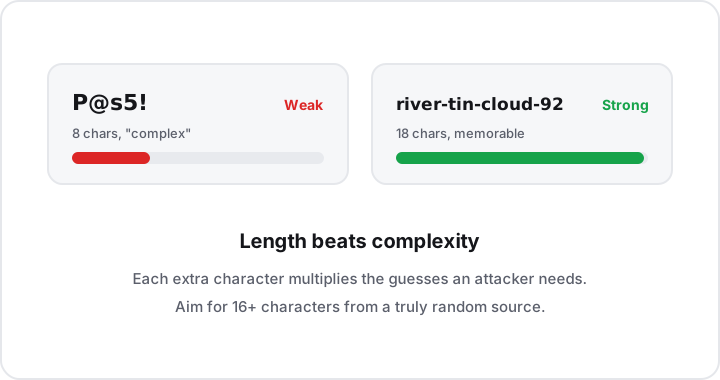
For years, the standard advice was “use a complex password”: mix uppercase, lowercase, numbers, and symbols. That advice produced passwords like P@ssw0rd! — which look complex but are actually weak, because attackers know exactly the substitutions people make (a becomes @, o becomes 0, an exclamation mark goes on the end).
The math tells a clearer story. Adding one more character to a password multiplies the number of guesses an attacker needs by the size of your character set. Adding a special symbol only widens that set a little. So a longer password almost always beats a shorter “complex” one — as the figure above shows, length pushes the difficulty up far faster than sprinkling in punctuation does.
This is why a passphrase of several random words can be both strong and memorable. A string of unrelated, randomly chosen words is long, hard to guess, and easier to type than a wall of symbols. The key word is random: a phrase you chose because it’s meaningful to you is exactly the kind of thing an attacker’s wordlist already contains.
Complexity rules still have a place
Many sites force a mix of character types, and a generated password will satisfy those rules anyway. The point isn’t to avoid symbols — it’s to stop relying on them as your source of strength. Get the length and randomness right first, and complexity takes care of itself.
Why “generate it” beats “think one up”
Humans are terrible random number generators. We reach for words, dates, pet names, and patterns, and we repeat ourselves across accounts. Attackers exploit exactly these habits.
A good generator removes the guesswork by drawing from a cryptographically secure source of randomness. In a browser, that source is the Web Crypto API — specifically crypto.getRandomValues() — which is designed to be unpredictable. That’s very different from the simple “random” functions used for things like shuffling a playlist, which are predictable enough that they should never be used for security.
Andev’s Password Generator is built on exactly this. It produces passwords locally, in your browser, using the Web Crypto API. Because the work happens on your device, the generated password is never sent anywhere — there’s no server that sees it, logs it, or could leak it. You get a strong password without trusting a third party with the result.
A practical checklist
Follow these and you’ve covered the things that genuinely matter:
- Go long. Use at least 16 characters. More is better, and the cost to you is nearly zero once a generator and password manager do the typing.
- Make it random. Generate it from a cryptographically secure source rather than inventing one yourself.
- Never base it on personal info. No names, birthdays, addresses, favorite teams, or anything someone could find or guess about you.
- Use a unique password per site. One account per password. If a single site is breached, the damage stops there.
- Never reuse passwords. Reuse is how one leaked password turns into many compromised accounts via “credential stuffing,” where attackers replay leaked logins across other sites.
- Store them in a password manager. You’re not meant to memorize dozens of 16-character random strings — that’s the manager’s job. It also fills them in for you, so length stops being inconvenient.
- Turn on two-factor authentication (2FA). A strong password is your first line of defense; 2FA is a second lock that holds even if the password is somehow exposed.
How to make one in a few seconds
- Open the Password Generator.
- Set the length to 16 or higher (longer for accounts you really care about).
- Choose the character types you want — most sites are happy with a full mix.
- Copy the generated password into your password manager as you create or update the account.
- Turn on 2FA wherever the account offers it.
That’s the entire workflow. The generator handles randomness, the password manager handles memory, and you never have to invent or reuse a password again.
A note on related tools
Passwords and hashing are easy to confuse, so it’s worth being clear: a password is a secret you keep and reuse to log in, while a hash is a one-way fingerprint of some data, often used to verify integrity rather than to authenticate you. If you need to produce a checksum of a file or string, that’s a job for a hash generator — not a substitute for a strong, unique password. Don’t paste your passwords into a hashing tool expecting it to make them safe to store; that’s not what hashing a password for an account login involves.
Key takeaways
- Length and randomness win. They’re the only two factors that meaningfully decide how hard a password is to crack.
- The complexity myth is just that. A long random passphrase beats a short “complex” password like
P@ssw0rd!every time. - Let a secure tool generate it. Use a source built on the Web Crypto API’s
crypto.getRandomValues(), not a guessable or human-chosen string. - One unique password per site, every time. Never reuse, never base it on personal info, and store them in a password manager.
- Add a second lock. Turn on two-factor authentication so a single exposed password isn’t game over.
Make your next password a strong one
The Password Generator is free, needs no sign-up, and runs entirely in your browser — your password is built locally with the Web Crypto API and never leaves your device. Generate a 16-character random password in one click, drop it into your password manager, and explore the rest of Andev’s private, in-browser tools for more security tasks done the same private way.