How to Use a Mortgage Calculator (and Read It)
To use a mortgage calculator, enter the loan amount (home price minus your down payment), the annual interest rate, and the term in years — the calculator returns your estimated monthly principal and interest payment. Andev’s mortgage calculator does this instantly in your browser, with no sign-up, and updates the result the moment you change a number.
The trickier part isn’t typing numbers in; it’s reading what comes back. A single monthly figure hides a lot, so this guide walks through each input and what the results actually mean.
What a mortgage calculator actually computes
At its core, a mortgage calculator solves one equation: how much you’d pay each month to fully repay a loan, with interest, over a fixed number of months. That’s the standard amortization formula:
M = P · r · (1 + r)ⁿ ⁄ ((1 + r)ⁿ − 1)
Where:
- M is the monthly principal-and-interest payment.
- P is the principal — the amount you’re actually borrowing.
- r is the monthly interest rate, which is the annual rate divided by 12.
- n is the total number of monthly payments (years × 12).
You don’t need to do this by hand — that’s the whole point of the tool. But knowing the formula explains why small changes to the rate or term move the payment as much as they do.
The inputs, one by one
A good calculator keeps inputs simple. Here’s what each one means and why it matters.
- Home price. The purchase price of the property. On its own it isn’t what you borrow — your down payment comes off the top first.
- Down payment. The cash you pay upfront. Subtract it from the home price to get the loan amount (the P in the formula). A larger down payment means a smaller loan, a smaller payment, and less total interest over the life of the loan.
- Interest rate. The annual rate your lender charges, entered as a percentage. The calculator converts it to a monthly rate internally. Because interest compounds over hundreds of payments, even a fraction of a percentage point changes the total noticeably.
- Term. How long you have to repay, usually expressed in years. A shorter term raises the monthly payment but cuts total interest sharply; a longer term lowers the monthly payment but stretches out — and adds to — the interest you pay.
Change any one of these and the monthly figure updates immediately, which makes the calculator ideal for “what if” comparisons: what if I put more down, what if the rate were lower, what if I chose a shorter term?
Principal and interest is only part of the bill
The formula above produces your principal and interest payment — but that’s rarely the full amount that leaves your account each month. Two other costs usually ride along:
- Property tax, charged by your local government and often collected monthly alongside the loan payment.
- Homeowners insurance, which many lenders require and frequently bundle into the monthly total.
If your calculator includes fields for these, add them to see a more realistic total monthly cost rather than just the loan portion. The principal-and-interest number is the part the amortization formula controls; taxes and insurance are layered on top and can shift the total meaningfully.
How to read the results: amortization
This is where most people get tripped up. Your monthly payment stays the same every month (for a fixed-rate loan), but what that payment is doing changes over time.
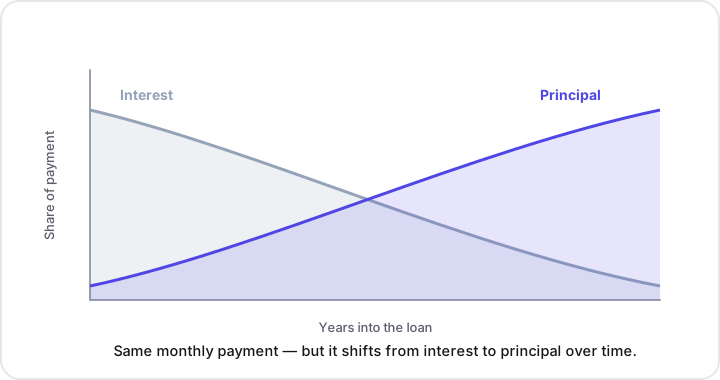
Each payment is split into two parts: interest and principal. Early on, you owe interest on a large remaining balance, so most of each payment goes to interest and only a little chips away at the principal. As the balance shrinks, the interest portion shrinks with it, and more of each payment goes toward principal. By the end of the term, payments are almost entirely principal.
The figure above shows this crossover: the interest slice starts tall and tapers off, while the principal slice grows. Two practical lessons fall out of that shape:
- Progress feels slow at first. In the early years, your balance barely moves even though you’re paying every month — that’s expected, not a mistake.
- Total interest can be large. Over a long term, the sum of all those interest portions adds up. Seeing it laid out is often the most eye-opening part of using a calculator.
What lowers the total interest
Because interest is charged on the outstanding balance over time, two levers reduce the total you pay:
- A larger down payment shrinks the principal from day one, so there’s less balance to charge interest on.
- A shorter term means fewer months of interest and a faster-shrinking balance — even though each payment is higher.
A calculator lets you test both side by side and see the trade-off between a comfortable monthly payment and a lower lifetime cost.
A quick worked example
Suppose you’re looking at a home and want to compare scenarios. Enter the price, try a down payment, pick a rate, and set the term — say, 30 years versus 15 years. You’ll typically see the 15-year option carry a higher monthly payment but a dramatically lower total interest figure. Then bump the down payment up and watch both the monthly payment and total interest fall. None of these are recommendations; they’re just the math made visible so you can weigh the options that fit your situation.
Mortgage vs. other loan math
A mortgage is a specific kind of installment loan, so the same amortization logic applies elsewhere. If you’re sizing up a car loan, a personal loan, or a student loan, the general-purpose loan calculator uses the same formula with different defaults. And when you just need to work out a down-payment percentage or compare rates as plain percentages, the percentage calculator handles that quickly.
Key takeaways
- Three inputs drive the payment: loan amount (price minus down payment), interest rate, and term. The calculator plugs them into the amortization formula for you.
- Principal and interest isn’t the whole bill. Add property tax and homeowners insurance for a realistic monthly total.
- Read the amortization, not just the monthly number. Early payments are mostly interest; later payments are mostly principal.
- Two levers cut total interest: a larger down payment and a shorter term — each with its own trade-off.
- It’s a comparison tool. Adjust the inputs and watch the results to understand your options; it isn’t financial advice.
Try it yourself
Open Andev’s mortgage calculator to estimate a monthly payment and see the amortization breakdown in seconds. It runs entirely in your browser, needs no sign-up, and updates instantly as you change the numbers. When you’re done, explore the rest of Andev’s free, private in-browser tools for the rest of your number-crunching.